
Loading live status...
Fetching live telemetry from official Roblox APIs
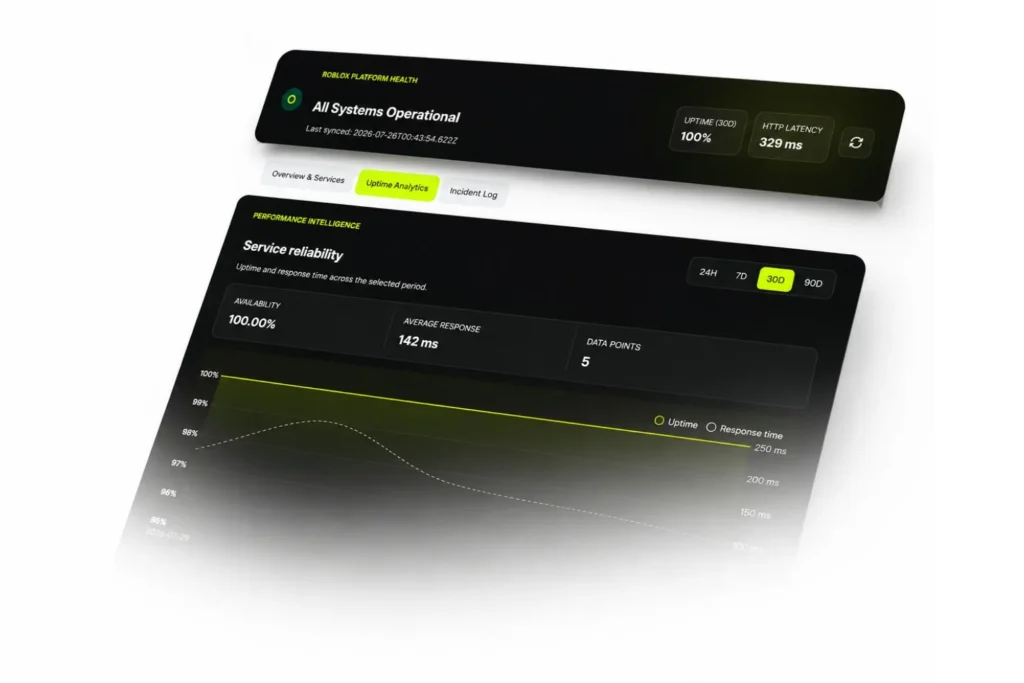
Service reliability
Uptime and response time across the selected period.
Roblox Server Status Is Down or Not? How to Check Server Status.
When Roblox freezes on the loading screen, kicks you out mid game, or throws an error code at you, the first thing to check is whether the problem sits with Roblox or with your own connection. The fastest way to find out is to open the official Roblox Status page alongside a live outage tracker at the same time.
If a service on the status page shows anything other than Operational, or if outage reports spike sharply across many regions, Roblox is likely down for everyone. If both sources look normal, the issue is probably local: your device, your network, or the specific game you are trying to join. This guide covers how to read a roblox server status check the right way, what the common error codes mean, and what to do while you wait for the servers to come back online.
Reviewed against Roblox’s official Status page and Support documentation, 2026.
How to Use the Roblox Server Status Tool?
Open the tool and it pulls live data straight from Roblox’s own Status feed and its Open Cloud systems, so what you see matches what Roblox itself reports. The dashboard refreshes on its own, usually somewhere between every 30 seconds and every 10 minutes, depending on when Roblox posts a new update. You can also press Refresh at any point to pull the latest data right away.
At the top of the screen you will see the overall platform status, the last time the data synced, the 30 day uptime percentage, and the current response speed.
The Overview and Services tab breaks Roblox into three groups: User, Player, and Creator. Each service inside those groups, including login, gameplay, Studio, the Marketplace, and the avatar editor, shows its own status, so you can tell in a few seconds which part of Roblox is actually affected instead of assuming the whole platform is down.
The Uptime Analytics tab shows overall availability, average response time, and how many data points have been collected. You can switch between 24 hours, 7 days, 30 days, and 90 days to spot patterns, such as whether outages tend to cluster around big updates or in game events.
The Incident Log tab lists official Roblox incidents in order, with the title, the date it started, a short description, and its current stage: Investigating, Identified, Monitoring, or Resolved. This is the fastest way to confirm whether a problem is hitting every player or just your account.
About the Tool.
This tool does not guess whether Roblox is working. It reads directly from Roblox’s own Status page and Open Cloud systems, then displays that information in one place instead of asking you to check several tabs or apps. Because it checks every 30 seconds to 10 minutes and supports an instant manual refresh, it usually reflects a problem within minutes of Roblox posting it, sometimes even before casual users notice anything wrong. That combination of official sourcing, frequent refreshes, and a full incident history is what makes this a more complete roblox server status check than relying on a single status page alone.
Is Roblox Down for Everyone, or Just for You?
Most Roblox connection problems fall into one of three groups.
Before assuming the servers are down, check the official status page and an outage tracker first. If reports are spiking everywhere, it is a platform wide issue and there is nothing to fix on your end except waiting. If everything looks normal there, try the basics: restart your router, switch from Wi Fi to a wired connection if you can, close any apps using heavy bandwidth, and make sure your Roblox app is fully updated. These simple steps solve a large share of connection problems that feel exactly like a server outage but are not.
Roblox Server Status on PC, Mobile, and Xbox.
Roblox runs the same core servers across every device, but each platform can show problems differently.
On PC and Mac, most issues show up as a stuck loading screen or a specific error code when a game tries to load.
On the mobile app, a common sign is the app freezing right after launch or failing to reconnect after switching networks.
On Xbox, problems can appear even after Roblox has already fixed something on other platforms, since Xbox often takes longer to sync with account and server changes. If Xbox still shows a problem after the main status page looks clear, fully close and reopen the app so it can resync.
A stuck loading screen is not always a server problem either. Sometimes the local app has a corrupted file or an outdated version, and no amount of waiting fixes that. If a restart and a network check both come up clean and the app still will not load past the splash screen, remove the current install completely and grab a fresh copy from the official Roblox download page or try a third party Roblox Mod APK for testing.
Roblox Studio Server Status.
Studio runs on some of the same back end systems as the main Roblox platform, but it is tracked as its own component on Roblox’s official status page. That means Studio can go down while the game client works fine, and the game client can have issues while Studio stays up.
The most common Studio specific problem is a lost connection during Team Create, Roblox’s real time collaboration feature, which normally shows as its own separate error code rather than a general platform outage. If Studio will not publish, will not save, or keeps disconnecting collaborators, check the Creator component on the status page before assuming your project is broken.
Common Roblox Error Codes and What They Mean.
Error 279, also listed as ID 17, means the game failed to connect. Try a different network first, then reinstall if it continues.
Error 277 means you lost connection to the game server mid session. This is usually a local network problem rather than a wide outage.
Error 266 means your connection timed out before Roblox could respond. Check your internet connection and firewall settings.
Error 268 means you were kicked for unexpected client behavior, which often points to a corrupted local install rather than anything wrong with Roblox’s servers.
Error 270 is specific to Studio and means you lost connection to Team Create. It almost always clears up once your network stabilizes.
Why Roblox Servers Go Down?
Roblox is one of the largest online platforms in the world, and its outages tend to make headlines because of how many players they affect. During one widely reported incident, outage tracking site Downdetector logged over 100,000 user reports at the peak of a single outage affecting tens of thousands of players in the United States, according to Reuters.
Most outages trace back to a handful of causes: a scheduled update that introduces a bug, a sudden spike in players during a popular event, or back end systems such as authentication and matchmaking failing to scale fast enough under heavy load. True platform wide outages are not something you can fix locally. The only real option is to wait for Roblox’s engineers to resolve it, which is exactly why checking the official status page first saves time compared to repeatedly reinstalling the app.
What to Do While Roblox Servers Are Down?
Avoid submitting several support tickets for the same issue, since that usually slows down the response rather than speeding it up. Do not keep reinstalling the app once you have already confirmed a platform wide outage, since that will not change anything on Roblox’s end.
The best move is simply to bookmark the official status page, keep the outage tool open in another tab, and check back every few minutes instead of refreshing constantly.
A short outage is also a decent excuse to handle something you have probably been putting off, like settling on a new username for an alt account or a character you are planning. Our free Roblox username generator can spit out ideas in seconds, so by the time the servers are back you already have a name picked instead of stalling on it mid game.
Key Takeaway.
Check the official Roblox status page and a live outage tracker together before assuming your account or device is the problem. Most connection issues are local and fixable with a router restart, a wired connection, or an app update. Studio and the main game client are tracked separately, so one can be affected without the other. Full platform outages cannot be fixed locally and usually resolve within an hour.
Sources.
Roblox Status: https://status.roblox.com/
Roblox Support, General Connection Problems: help center article
Roblox Support, Error Code 279/ID 17: help center article
Roblox Support, Error Code 277: help center article
Roblox Support, Error Code 266: help center article
Roblox Support, Error Code 268: help center article
Roblox Support, Error Code 270: help center article
Roblox Creator Hub, Open Cloud documentation: create.roblox.com/docs/cloud
Reuters via AOL, Roblox outage report: aol.com article