
Gamepasses are the main way small and mid size Roblox games turn players into paying supporters without charging a flat fee to join. A VIP room, a permanent speed boost, or a set of admin commands can all be sold once and kept forever, which is why almost every successful experience on the platform uses at least one. We have built and tested gamepasses across dozens of Roblox experiences, from small obby games to larger simulators, and this guide covers what actually works, not just what the menus let you click.
Gamepasses are easy to confuse with Developer Products, since both live under Monetization inside the Creator Hub. The short version is that a gamepass sells once per player and a Developer Product sells over and over, and picking the wrong one for a given item is the single most common mistake we see in new games. By the end of this guide you will know how to create a pass, price it, connect it to working code, and pick perks that players actually buy.
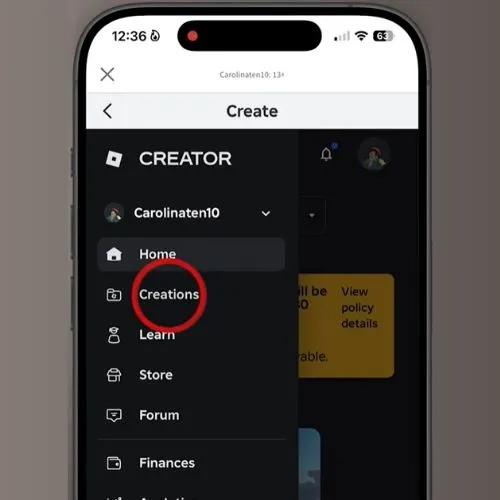
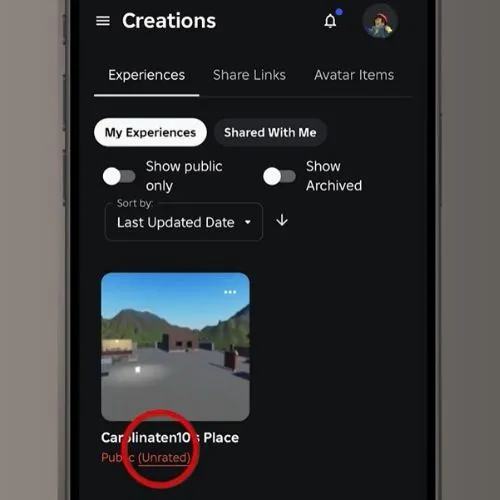
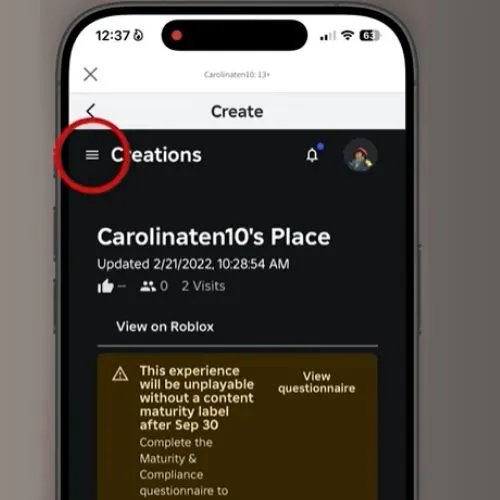
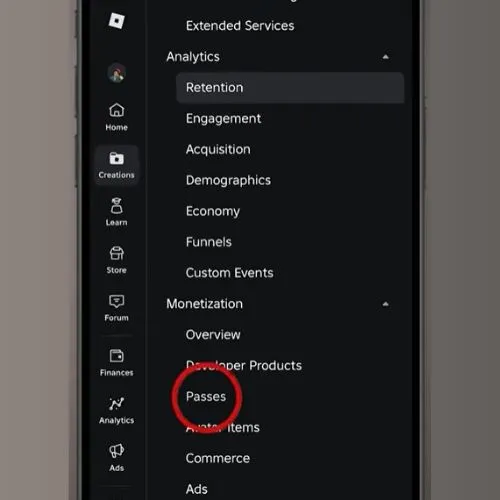
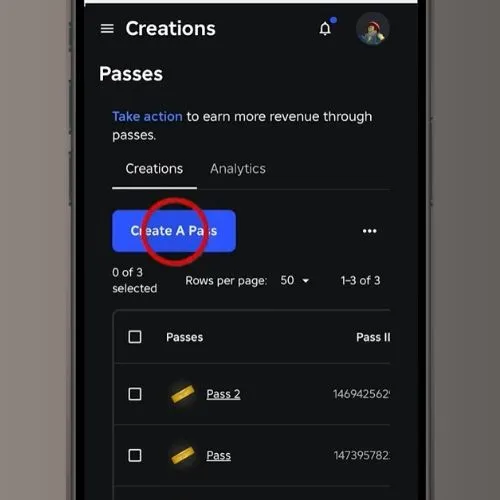
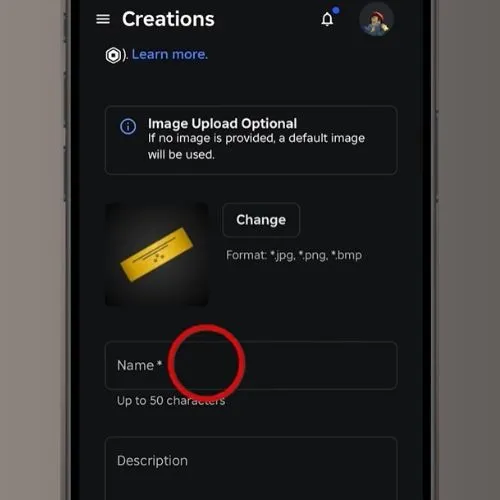
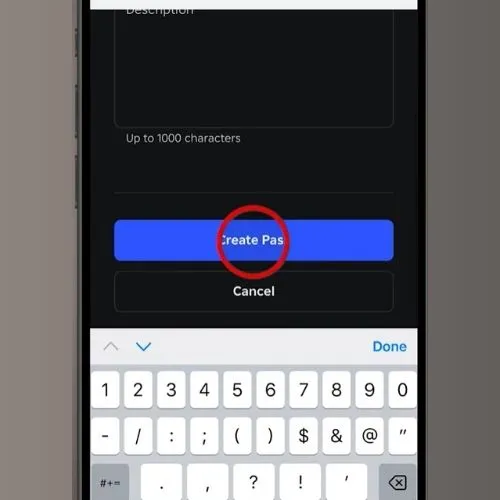
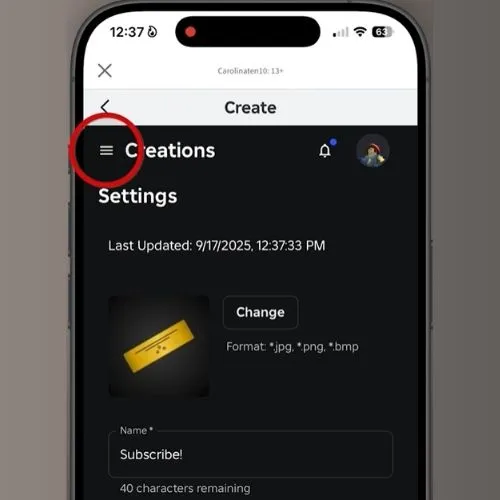
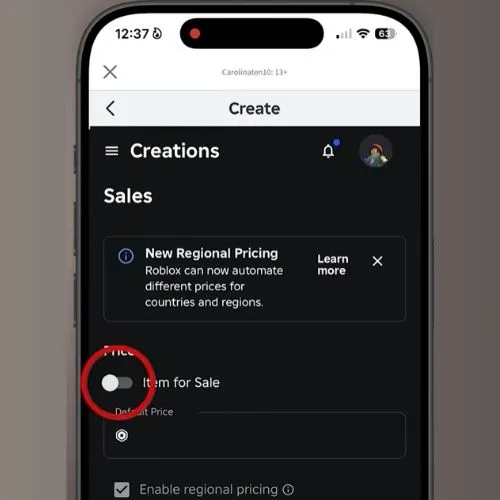
Quick answer: Go to create.roblox.com, open Creations, pick your published experience, then go to Monetization and Passes. Click Create a Pass, add a name, an image is optional, write a short description if you want one, then click Create Pass. To sell it, open the pass, go to Sales, turn on Item for Sale, set a Robux price, and save. Roblox keeps 30% of every sale as a marketplace fee, so you keep 70%.
What Is a Gamepass on Roblox?
A gamepass is a one time purchase. A player pays Robux once and keeps the perk forever inside that game. VIP rooms, extra tools, a permanent speed boost, or a special outfit all work well as gamepasses because the player only needs to own them once.
If you want players to buy something again and again, such as coins, potions, or extra lives, use a developer product instead. A common mistake first time creators make is turning in game currency into a gamepass. Once a player owns it, they can never buy more of it, and you lose repeat sales from that player for good. After watching this mistake play out across several games, it is almost always the single biggest revenue leak in a new creator’s setup.
| Feature | Gamepass | Developer Product |
|---|---|---|
| Permanent ownership | Yes | No |
| Can be bought again | No | Yes |
| Good for VIP or perks | Yes | No |
| Good for coins or currency | No | Yes |
| Good for extra lives or retries | No | Yes |
| Refundable | No | No |
| Set up under | Monetization, Passes | Monetization, Developer Products |
| Checked with | UserOwnsGamePassAsync | Receipt callback on purchase |
Before You Start.
Your game needs to be published on Roblox first. A gamepass has to attach to a real, live place, so an unpublished project will not let you create one. You also need a Roblox account in good standing, since restricted or newly created accounts sometimes face extra limits on monetization tools.
How to Make a Gamepass on Roblox?
Here is the exact path, based on how creators actually move through the site rather than the idealized version in the docs.
That’s it. Your pass now exists, but it is not for sale yet and it does not do anything in your game until you finish the next two steps.
How to Make a Gamepass on Roblox Mobile?
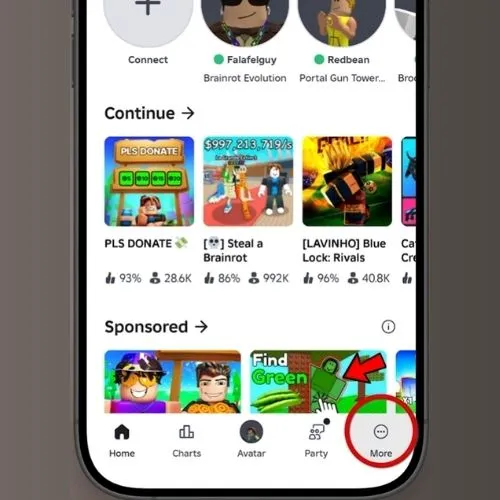
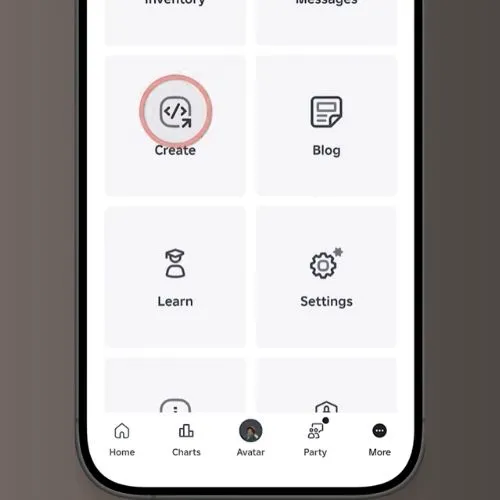
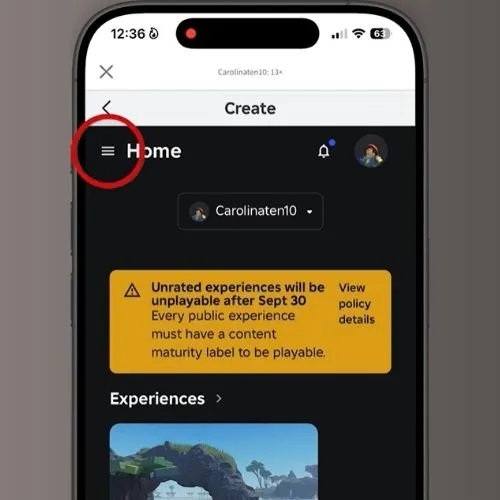
The steps are almost the same on the Roblox app. Open the app, log in, tap the three dot icon, then tap Settings, then Account Info if you need to check your account first. To reach the pass creation screen itself, most creators still find it faster to switch to a browser, since the Creator Hub loads its full Monetization menu more reliably there. Once your game is published, the create pass flow itself matches the desktop steps above.
How to Get the Gamepass ID.
You need the pass ID to make it work with code. Go to Monetization, then Passes, hover over your pass thumbnail, click the three dot icon, and select Copy Asset ID. Save that number somewhere, since you will paste it into your script.
How to Price a Gamepass on Roblox?
This is the part most guides skip, and it’s the part players and creators both ask about most.
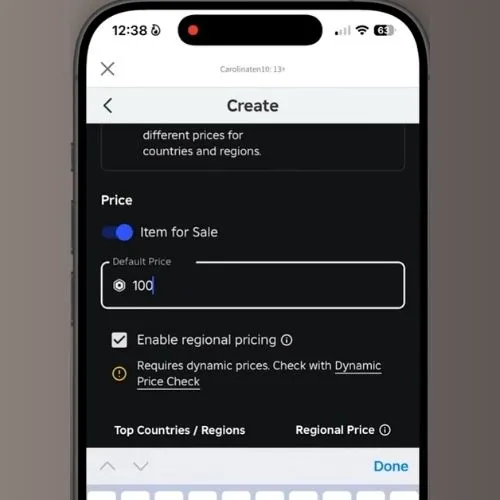
Roblox takes a flat 30% marketplace fee on every gamepass sale. If you price a pass at 100 Robux, you keep 70 Robux. If you want to actually receive a round number like 700 Robux from a sale, set the price at 1,000, not 700.
The minimum price is 1 Robux and the maximum is 1 billion Robux, but real pricing works best in tiers. A small perk, such as a name color or emote, fits 25 to 99 Robux. A meaningful upgrade, like a VIP room or a speed boost, usually sits between 100 and 499 Robux. A major pass, such as flight or every weapon unlocked, can go from 500 to 1,500 Robux or higher depending on your game’s audience.
After testing pricing across dozens of experiences, passes set between 49 and 149 Robux tend to convert better than higher priced passes in newer games, mainly because new players have not built enough trust in an unfamiliar game to spend a lot of Robux on it yet. Once a game has a steady player base and reviews, higher priced passes start converting at a normal rate.
A few pricing habits worth borrowing from top selling games:
Start lower when your game is new. It is much easier to raise a price later than to lower it after early players already paid full cost. Check similar games in your genre before you pick a number, since players already have a rough sense of fair pricing from games they already play.
Best Gamepass Ideas That Actually Sell.
Not every idea makes a good gamepass. These are the perks we see selling consistently across working Roblox experiences, along with what tends to help or hurt each one.
VIP, pets with in game bonuses, and early access tend to increase retention the most, since owners have a reason to keep coming back. Admin style passes and heavy pay to win boosts tend to hurt retention for everyone who did not buy them, so they work best in casual or troll focused games rather than competitive ones.
How to Sell a Gamepass on Roblox?
Selling Inside Your Game:
Sell it inside your game by writing a script that checks ownership and prompts a purchase. Use MarketplaceService for this. A simple button, an NPC, or a shop menu can all trigger the purchase prompt.
Selling Outside Your Game:
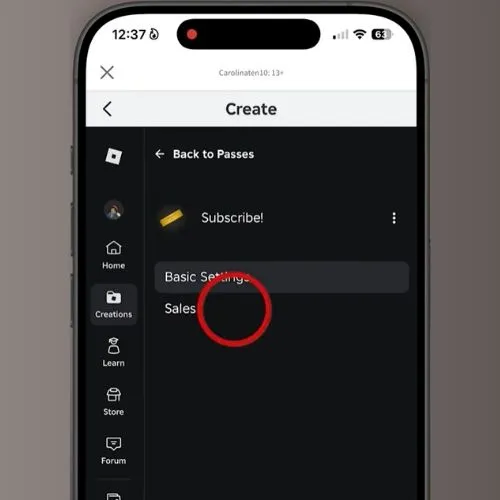
You can also sell a pass on your game’s own page. Go to Monetization, then Passes, click the three dot icon on your pass, select Sales, turn on Item for Sale, enter your price, and click Save Changes. The pass now shows up on the Store tab of your game’s page, and players can buy it there even before joining, or share the direct link with friends to receive Robux from people who support the game.
How to Script a Gamepass So It Actually Works?
Creating a pass on the website does nothing by itself. You have to write a short script so the game knows what to give a player who buys it.
First, check if a player already owns the pass when they join, using UserOwnsGamePassAsync:
local MarketplaceService = game:GetService("MarketplaceService")
local Players = game:GetService("Players")
local passID = 0000000 -- your pass ID here

local function onPlayerAdded(player)
    local hasPass = false
    local success, message = pcall(function()
        hasPass = MarketplaceService:UserOwnsGamePassAsync(player.UserId, passID)
    end)
    if hasPass then
        -- give the player their perk here
    end
end

Players.PlayerAdded:Connect(onPlayerAdded)
Second, prompt a purchase when a player clicks a button, using PromptGamePassPurchase:
MarketplaceService:PromptGamePassPurchase(player, passID)
Third, handle what happens right after someone buys it, so they get the perk without needing to rejoin:
MarketplaceService.PromptGamePassPurchaseFinished:Connect(function(player, purchasedID, success)
    if success and purchasedID == passID then
        -- grant the perk immediately
    end
end)
Put these scripts inside ServerScriptService so the server, not the player’s own device, controls who gets the perk. This keeps players from faking ownership.
How to Make a Donation Gamepass on Roblox?
A donation pass works exactly like any other pass. Many creators price it at a round number, like 25 or 50 Robux, name it something like Support the Game or Donate, and skip attaching any real perk to it, since the point is simply letting players give Robux to support development. Some creators do add a small thank you message or a name on a supporters wall as a light reward, which tends to encourage more donations than a pass with nothing at all.
How to Fix Common Gamepass Problems?
A gamepass shows up in your game that you didn’t create. This usually means someone else on your development team added it, or an old test pass was never deleted. Check the full Passes list under Monetization and remove anything you don’t recognize.
You bought a gamepass and want to get rid of it. Roblox does not offer refunds for gamepasses by default, since the purchase is treated as final once you own it. The only exceptions are unauthorized charges or a proven technical error, which require contacting Roblox Customer Service directly with proof of the issue.
Gamepass Analytics.
Roblox gives you basic sales data for each pass under the Analytics tab inside Monetization and Passes. You can see your top sellers over time, net revenue per pass, and how many sales came through the Buy Robux promotion page if you opted in. Roblox does not track which specific user bought which pass, so if you need that detail for your own records, you have to store it yourself.
How These Pieces Fit Together.
Every gamepass sits inside a larger system, and understanding how the pieces connect makes troubleshooting much easier. You build and publish an Experience in Roblox Studio, then manage its monetization through the Creator Hub. Inside the Creator Hub, Passes and Developer Products are two separate tools under Monetization, each with its own Asset ID once created. A script running in ServerScriptService uses MarketplaceService to call UserOwnsGamePassAsync when checking ownership and PromptGamePassPurchase when starting a sale. After a sale, Analytics inside the Creator Hub reports revenue back at the Experience level, so a creator can see how each pass performs without touching code again. Once you see how Studio, the Creator Hub, MarketplaceService, and Analytics connect, adding a second or third gamepass becomes far faster than the first one.
Key Takeaway.
A gamepass is a one time purchase for a permanent perk, while a developer product fits repeat purchases. Your game must be published before you can create one. Roblox keeps 30% of every sale, so price with that cut in mind. Creating a pass on the website does nothing until you add a script that checks ownership and grants the perk. Gamepass purchases are final, so clear names and descriptions matter since buyers usually cannot get a refund.
Sources.
Roblox Creator Hub, Passes documentation
Roblox Creator Hub, Marketplace fees and commissions
Roblox Creator Hub, Developer products
Roblox Creator Hub, MarketplaceService reference
Roblox Support, Community Standards
Roblox Creator Hub, Data stores