
How to Change Your Age on Roblox?
Your birthday on Roblox decides more than just a number on your profile. It controls who you can chat with, which games appear in your search results, and whether features like voice chat are available to you. Most guides stop at listing the settings menu steps. This one also covers why the wrong birthday gets entered in the first place, what actually changes the moment you fix it, and how to solve the errors that stop the process from working.
Quick answer: If your account is 13 or older, you can edit your birthday yourself in Settings under Account Info. If your account is under 13, the field is locked and you need to contact Roblox Support instead. Most corrections finish within minutes, though a support ticket can take up to a day.
Reviewed against Roblox’s official Support Center and Safety documentation (July 2026).
Can You Change Your Age on Roblox?
Yes, if you are 13 or older, open Settings, then Account Info, and update your birth date.
If you are under 13, the birthday field is locked. You will need to contact Roblox Support, since Roblox designed this limit to follow the Children’s Online Privacy Protection Act (COPPA), a rule enforced by the Federal Trade Commission (FTC) that protects young users online.
This lock works alongside the broader Roblox Age Verification system, which sorts every account into an age group and controls chat range and content visibility.
Process of Changing Your Birthday If You’re 13 or Older.
You can change your age on the Roblox official or in the modified version on any device within a minute using my tested ways.
On PC or Mac Through the Website
Log in to your account on a browser. Click the gear icon in the top right corner and select Settings. Open the Account Info tab and scroll to the Personal section. Find the birthday field, select the edit option, enter the correct date, and save.
On the Mobile App (Android and iPhone)
Open the Roblox app and log in. Tap the three dot icon in the bottom right corner, then tap Settings. Select Account Info, scroll to Personal, and tap the edit icon next to your birthday. Enter the correct date and tap Save. Android and iPhone use the same layout, so the steps do not change between the two.
On Xbox
You cannot edit your birthday directly through the Xbox version of Roblox. Log in through a browser or the mobile app instead, and make the change there. The update syncs to Xbox the next time you open Roblox on the console. Xbox runs its own separate set of account and privacy rules through your Microsoft profile. If that profile is marked as a child account, it can keep certain features locked even after your birthday on Roblox itself is correct. For a full breakdown of these device level settings, see our Roblox Privacy Settings guide.
Why You Can’t Self-Edit Your Birthday If You’re Under 13.
If your account shows under 13, the birthday field stays locked. This protects account restrictions such as chat filters and privacy settings that are built specifically for young users.
If the birth year was entered incorrectly and you are actually 13 or older, contact Roblox Support through the age based settings category. Explain exactly what was entered wrong. According to Roblox’s own safety documentation, requests like this are reviewed carefully, since many similar tickets come from users trying to remove protections rather than fix a genuine mistake.
Why People Enter the Wrong Birthday in the First Place.
This mistake happens more often than people expect, and it usually comes from one of a few common situations.
Clicking through the sign up screen too fast is the most common cause. The birth date dropdown defaults to a set month and year, and many users tap continue without changing it.
Creating the account as a young child is another common reason. A parent may set up the account years later and only then notice the original birth year was never entered correctly.
Shared family devices also cause mix ups. If more than one child uses the same tablet or computer, it is easy to select a sibling’s saved account details by accident.
Picking the wrong option from the dropdown menu happens too, especially on mobile screens where the day, month, and year wheels sit close together.
How Age Changes Interact With Age Verification.
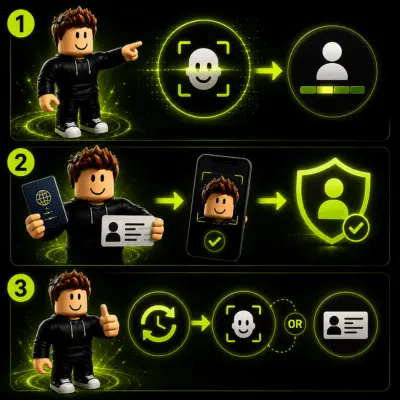
Roblox confirms age two ways: facial age estimation and government ID verification.
Facial age estimation uses a short camera scan through Persona, a third party identity verification company. It places your account into an age range without needing a document. Roblox states that the scan data is deleted once the estimate finishes.
If the estimate is wrong, or you want to dispute it, government ID verification is the backup option. This needs a valid photo ID, such as a passport or driver’s license, along with a matching selfie.
An account can only drop out of adult verified status once. After that single reversal, the option to undo it again is no longer available. If your account already went through age estimation and the result looks wrong, you can reset the check once using the option labeled “Did we get your age group right.” After the reset, you will need to redo either the facial scan or the ID process. Our dedicated Roblox Age Verification guide covers this process in full detail, including all six age groups.
What Changes After You Update Your Age.
What Does NOT Change?
Several things stay exactly the same when you update your birthday:
If any of these appear different after a birthday change, the cause is unrelated and worth checking through our Roblox Account Recovery guide instead.
Common Errors When Changing Your Age.
Some common errors occur when you are trying to change your age. On that point, most of us think How to change age in Roblox?
The save button does nothing.
Select the date from the dropdown menus instead of typing it in.
The birthday field is missing entirely.
This usually means Account Restrictions are active, often tied to a Parent PIN or a linked parent account. See our Roblox Parental Controls guide for how these locks work.
Xbox is not showing the update.
Fully close and reopen the Roblox app on the console so it can sync again.
ID verification keeps failing.
Poor lighting is the top cause. Lay the ID flat on a dark surface and avoid direct flash.
A verification email never arrives.
Check spam folders first, then confirm the email listed in Account Settings is correct and active.
The date keeps reverting to the old one.
Clear the browser cache or fully update the mobile app before trying again.
The account shows signs of being hacked.
Stop making changes and go through Roblox Account Recovery immediately instead of editing settings.
The account shows signs of being hacked.
Stop making changes and go through Roblox Account Recovery immediately instead of editing settings.
The reset option for age group is missing.
This option only works once. If it was already used, Roblox Support is the only remaining path.
A parent’s PIN blocks the change.
A Parent Account will need to adjust Communication Settings or Privacy Settings before the birthday field unlocks. Full setup steps are in our Roblox Parental Controls guide.
A server outage is affecting settings.
Check the official Roblox status page before assuming the account itself has a problem.
Key Takeaway.
Accounts 13 and older can edit their birthday directly in settings. Accounts under 13 need Roblox Support for any correction. Voice Chat is not turned on automatically after an age change. Xbox users must make the change through a browser or the mobile app first. Government ID may be required if facial age estimation gives an incorrect result. Robux, inventory, friends, and purchases are never affected by a birthday change.
Sources.
Roblox Support, Account Info and Settings: https://en.help.roblox.com/hc/en-us/articles/203313100-How-to-Update-Account-Info
Roblox Safety Center: https://about.roblox.com/safety
Roblox, Facial Age Estimation overview page: https://about.roblox.com/age-estimation
Federal Trade Commission, Children’s Online Privacy Protection Rule (COPPA): https://www.ftc.gov/legal-library/browse/rules/childrens-online-privacy-protection-rule-coppa
Persona, identity verification provider used by Roblox: https://withpersona.com